How to Check BAPE Coupon Eligibility Before Checkout
-
Find your place
# How to Check BAPE Coupon Eligibility Before Checkout If you're planning to browse BAPE items on fashion-reps and complete your order through the shopping agent selected on the page, the most important thing before checkout isn't hunting for the "highest discount"—it's verifying whether the coupon actually applies to your current items, order amount, and shipping plan. Coupons are usually managed by the shopping agent's checkout system; fashion-reps primarily handles product discovery, category
Editor score 4.2 / 5
If you're planning to browse BAPE items on fashion-reps and complete your order through the shopping agent selected on the page, the most important thing before checkout isn't hunting for the "highest discount"—it's verifying whether the coupon actually applies to your current items, order amount, and shipping plan. Coupons are usually managed by the shopping agent's checkout system; fashion-reps primarily handles product discovery, category organization, and purchase entry redirection. Orders, payment, service fees, and logistics are handled by the selected agent.
This article tackles one specific task: creating a reviewable record of BAPE coupon eligibility before submitting your order. After completing this check, you should be able to decide whether to use the discount, hold off on checkout, or abandon a coupon whose terms can't be confirmed.
This article does not cover situations where you've already entered the agent's site but need to deal with account login, payment failure, customs declaration, or after-sales disputes. Those issues should be resolved based on the agent's checkout page, order page, and official customer service information.

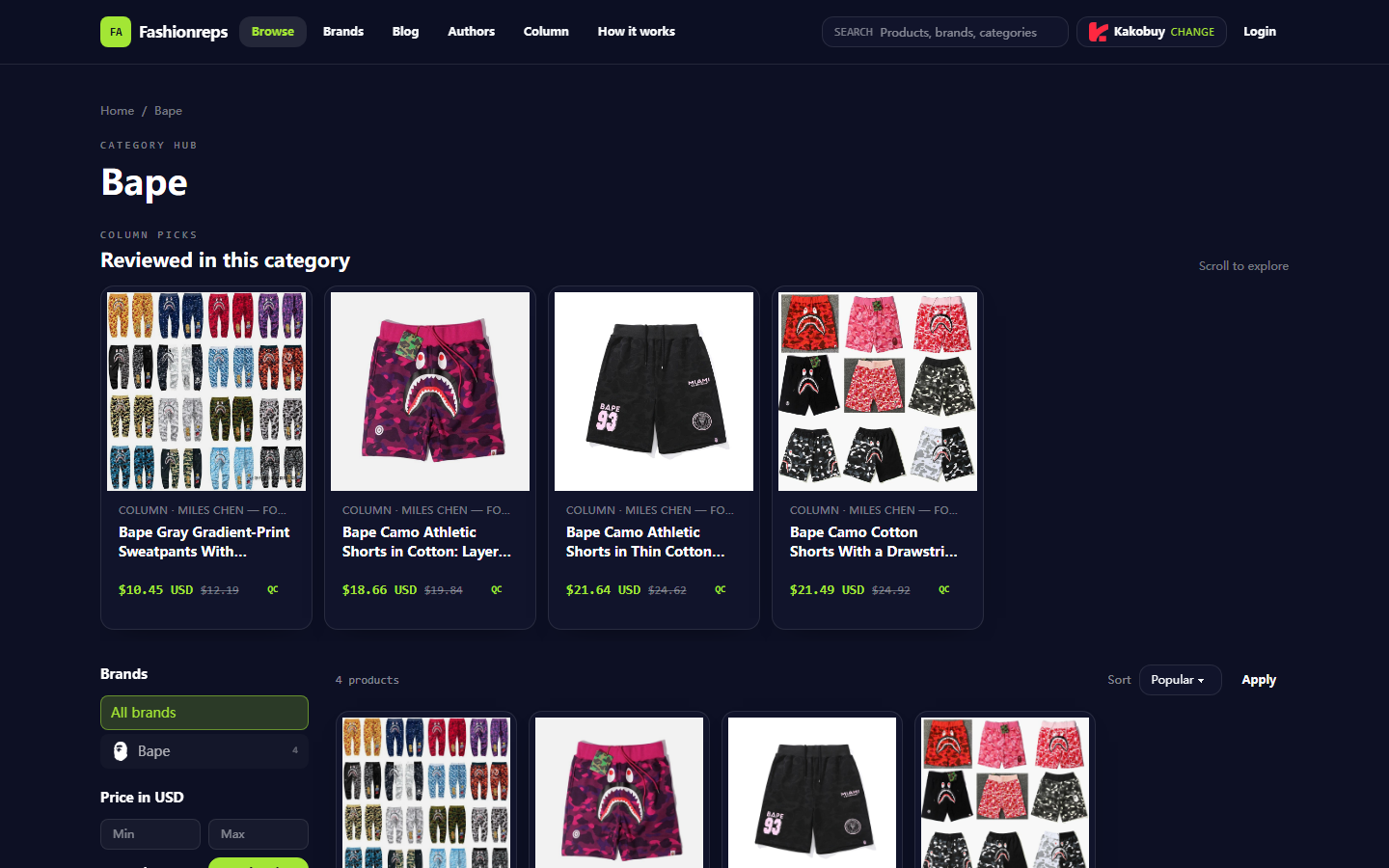
Image: Example of fashion-reps' BAPE category page. The page is for discovering items and entering the shopping agent; coupon availability still needs to be verified on the actual agent checkout page.
Clarify the Checkout Task and Evidence Boundaries for BAPE Coupon Verification
First, break down "having a coupon" into verifiable questions:
- Is the coupon provided by the currently selected shopping agent?
- Do you need to log in, claim it, or meet new-user requirements?
- Does the order's item amount meet the threshold?
- Are BAPE or the current items excluded brands, categories, or products?
- Does the discount apply only to the item amount, or can it also reduce service fees, international shipping, or payment fees?
- What time zone is used to calculate the validity period?
- Is stacking with other discounts allowed?
- After applying, does the order still meet minimum order amount, route, or payment method requirements?
The currently available fashion-reps BAPE category data shows that the page provides item browsing, reference prices, and shopping agent selection entry, but it does not include confirmable BAPE-specific coupon codes, fixed discount amounts, validity periods, or applicable agents in the provided information. Therefore, this article does not provide unverified coupon codes, nor does it guarantee any savings.
Evidence strength should be graded:
- Strong evidence: The actual agent checkout page clearly shows the coupon name, discount amount, applicable scope, and expiration time.
- Moderate evidence: The agent's official promotion page clearly lists the conditions, but the coupon has not yet been successfully applied to the current order.
- Weak evidence: Search results, social media posts, old screenshots, or third-party coupon pages.
- Insufficient evidence: Only the words "coupon" or "discount" without amount, threshold, exclusions, or validity.
Only strong evidence supports the conclusion that "it can be used now." 🧾
Record BAPE Items and Specifications from the fashion-reps Product Page
Before checking the coupon threshold, record the items themselves. The fashion-reps BAPE category data shows 4 items, and the page displays reference prices, which are not equivalent to the agent's final quote, nor do they include the order total with service fees and international shipping.
Item record Page reference price Still to verify before checkout Bape grey gradient print drawstring sweatpants, up to size 6XL 10.45 USD, original reference 12.19 USD Actual item amount, available sizes, stock, and agent quote Bape cotton camo sports shorts, layered camo pattern 18.66 USD, original reference 19.84 USD Whether the item is in an excluded category, whether actual amount varies by size Bape thin cotton camo sports shorts, drawstring mid-rise 21.64 USD, original reference 24.62 USD Whether page price matches agent cart price Bape cotton camo shorts, M–3XL 21.49 USD, original reference 24.92 USD Size, stock, coupon applicability, and checkout currency These prices only help you estimate whether you might meet the minimum spend threshold. You cannot infer coupon availability from them, nor should you treat the "original reference price" as a current discount or cash savings. There may be time lags between the product page, agent cart, and final checkout page; recheck before publishing or ordering.
When recording items, also save:
- Item title or product ID
- Currently selected size and quantity
- Item subtotal in cart
- Agent name
- Displayed currency
- Verification time in screenshot or order draft
- Whether the item shows unavailable, out of stock, or needs manual confirmation
Don't judge coupon eligibility based solely on the BAPE brand name. Coupon rules may differ by agent, promotion batch, category, seller, item status, or order source.
Verify Coupon Claim Entry, Applicable Threshold, and Validity
The fashion-reps page provides multiple shopping agent selection entries, including Superbuy, Mulebuy, JoyaGoo, Sugargoo, CNFans, Pandabuy, Weidian, and more. Actual coupons should not be considered universal across agents. You need to first confirm which agent the purchase button ultimately redirects to, then check the coupon in the same agent account and checkout environment.
Recommended verification order:
- Record the currently selected agent name; don't mix discount rules from different agents.
- Open the agent's official promotion page, coupon center, or order checkout page.
- Confirm whether the coupon needs to be claimed, and whether it's limited to new accounts, specified accounts, or specified payment methods.
- Check whether the minimum spend is calculated on item subtotal, tax-inclusive amount, or total order amount.
- Confirm the validity period's start/end time, time zone, and whether it's based on claim time or usage time.
- After adding BAPE items to the cart, observe whether the coupon automatically shows as available.
- After applying the coupon, recheck the order total, remaining threshold, and invalidation messages.
If the official page only says "limited-time offer" without a clear deadline, don't record it as a fixed validity period. If the coupon center shows it can be claimed, but the checkout page says it doesn't apply, follow the checkout page's specific reason and the agent's official instructions.
The current information does not provide a verifiable BAPE-specific coupon entry, code, or validity period, so I cannot fill in a specific discount code for you here. 🔎
Check Excluded Categories, Brands, Items, and Order Conditions
Coupons most often fail when they "seem to meet the threshold." BAPE items might be excluded due to brand, item type, seller, special promotion price, or order source, but without the current agent's original rules, you cannot assert that a particular item is definitely excluded or definitely eligible.
Key items to check:
- Brand exclusions: Whether the rules state that BAPE or specific brands do not participate.
- Category exclusions: Whether pants, shorts, clothing, shoes, accessories, or clearance items have different conditions.
- Item status exclusions: Whether discounted, special-priced, pre-sale, group-buy, custom, or limited items are not eligible.
- Seller exclusions: Whether the coupon applies only to specified sellers or product sources.
- Order source exclusions: Whether adding items via specific promotion pages, cashback portals, or external links changes eligibility.
- Quantity limits: Whether there are usage limits per account, order, item, or promotion cycle.
- Payment restrictions: Some discounts may support only specific payment methods or regions.
- Route restrictions: If the discount relates to international shipping, it may apply only to certain destination countries or logistics routes.
- Stacking restrictions: Item promotions, member discounts, shipping coupons, and account balances may not be combined.
If the rules use a general phrase like "some items excluded" without listing the exclusions, mark that condition as to-be-verified. Don't ignore the possibility that the final payment page may recalculate even if the cart temporarily accepts the coupon.
Distinguish Coupon Amount, Service Fees, Payment Fees, and Other Charges
The "savings" shown on the checkout page may not equal the actual amount you pay less. Break the order into different fee layers:
- Item subtotal: The amount for the selected BAPE items themselves.
- Agent service fee: Fees for purchasing, handling, warehousing, or other agent services.
- Storage and handling fees: May include inspection, photography, consolidation, reinforcement, or additional processing.
- International shipping: Usually depends on actual weight, volumetric weight, destination country, and logistics route.
- Payment fees: May include payment channel fees, exchange rate differences, or regional surcharges.
- Taxes and customs fees: Determined by destination country regulations, arranged by the carrier, or borne by the recipient; you cannot assume they're offset by a regular item coupon.
For example, a $10 coupon that applies only to the item subtotal, even if successfully deducted from the item amount, does not mean service fees, shipping, payment fees, or taxes are reduced. Only if the checkout page explicitly shows a decrease in those fees can you count it as actual savings.
Before and after using the coupon, record separately:
- Item subtotal before coupon
- Coupon amount
- Item subtotal after coupon
- Change in service fees
- Change in international shipping
- Change in payment fees or exchange rate
- Taxes and customs-related amounts
- Final total payable
The actual savings should be calculated as "final total payable before coupon minus final total payable after coupon," not by directly quoting the coupon's face value. 💵
Create a Coupon Eligibility Checklist Before Checkout
Before submitting payment, use the following table for a final confirmation:
Check item Evidence to see when confirmed Action if unconfirmed Agent identity Checkout page shows current agent name and account Return to purchase entry to confirm redirect target Coupon source Agent's official coupon center or checkout page Don't use unknown third-party codes Threshold Clear explanation of calculation basis and minimum amount Recheck activity conditions BAPE eligibility Cart shows available, or rules explicitly include Mark as to-be-verified Exclusions Checked brand, category, item, and seller restrictions Don't treat "claimable" as "usable" Validity Clear date, time, and time zone Hold off on checkout Stacking rules Confirmed whether combinable with item discounts or shipping coupons Recalculate with single discount Actual savings Final total payable actually decreased Don't claim savings After completing, save the order draft or checkout page record, but cover up name, address, phone, order number, payment info, and other account privacy. Don't publicly share full shipping labels or payment receipts.
If the page shows "coupon applied" but the total hasn't decreased, it could be that the coupon reduced one fee layer, was offset by changes in other fees, or the checkout page hasn't refreshed. In that case, refresh the order, recheck the fee details, and contact the current agent's official customer service for confirmation.
How to Mark To-Be-Verified Items When Current Information Is Insufficient
The current information confirms that fashion-reps has a BAPE category page, item reference prices, and a shopping agent selection mechanism; but it cannot confirm whether a specific agent currently offers a BAPE coupon, nor the threshold, exclusions, validity, stacking rules, or final savings.
Therefore, the following items should remain as to-be-verified:
- Whether the current agent has an available BAPE coupon
- Whether claiming or new-user conditions are required
- Whether the BAPE brand is excluded
- Whether BAPE pants and shorts fall under eligible categories
- Whether item reference prices count toward the minimum spend threshold
- Whether service fees and international shipping can be reduced
- Whether stacking with item discounts or shipping coupons is allowed
- Validity period and applicable time zone
- Destination country taxes, customs fees, and other receiving costs
Don't fill these gaps with old screenshots, forum reposts, or other agents' activity rules. Coupons are time-sensitive and must be re-verified in the actual checkout environment, recording the verification date, currency, agent name, and order conditions.
After Verification: Decide to Use, Hold Off, or Abandon the Coupon
You can use the coupon if: the current agent identity is clear, the coupon comes from a verifiable official entry, the BAPE items and order meet the threshold, no exclusions are triggered, it's within validity, stacking rules are clear, and the final total payable actually decreases.
Hold off on checkout if: the coupon requires login to view, validity is incomplete, whether BAPE is excluded is unclear, cart messages conflict with activity rules, or service fees and international shipping change inexplicably after applying the coupon.
Abandon the coupon if: the code's source is unknown, it asks for account passwords or payment info, the page claims guaranteed tax exemption or customs avoidance, the discount doesn't appear in the final bill, or you're buying items you don't need just to meet the threshold.
When deciding, the actual savings amount is only one factor. A coupon might reduce the item subtotal but increase the quantity purchased to meet the threshold; it might save a fixed fee but not change international shipping, taxes, or customs risk. Suitable users are typically those who already intend to buy, whose order naturally meets the threshold, and whose final bill is clear. It's not recommended to add extra items just to use a coupon, nor to continue checkout when rules are incomplete or involve non-compliant declarations.
For the current information, the safest conclusion is: first verify BAPE item eligibility, threshold, exclusions, and validity on the actually selected shopping agent's checkout page; before you have clear official rules and final bill amount, don't treat any promotional claims as confirmed discounts or guaranteed savings. ✅
Article Images

Agent Platform Shopping FAQ
1. Is the spreadsheet on hipobuy-sheet.com safe and reliable?
The spreadsheet you browse on hipobuy-sheet.com does not collect any personal information; its sole purpose is to serve as a product catalog for agent platforms. All purchases are completed on the agent platform.
2. Why do users of hipobuy-sheet.com need to use spreadsheets?
Agent platforms typically do not display products directly, so you need to use the spreadsheet on hipobuy-sheet.com to search for desired items and get purchase links. Another option is to ask for help on Reddit or Discord—these communities often recommend great items, but the whole shopping process can be quite slow. Such spreadsheets are usually compiled by editors after long-term collection of information from these platforms.
3. What types of products can be found in the spreadsheet on hipobuy-sheet.com?
The spreadsheet on hipobuy-sheet.com covers shoes, clothing, bags, accessories, sweatshirts, perfumes, hats, scarves, belts, and various home and lifestyle products.
Community feedback
5 approved
Reader score 4.2 / 5 (5 ratings)
- Sofia R. 4 / 5
- Solid advice. One thing to add though, read the coupon expiry carefully. I had one that looked valid but expired the same day and I missed it by an hour. Eligibility check would have caught that.
- lurker_88 5 / 5
- Been lurking here a while, first comment. Verified my coupon eligibility before checkout on a BAPE tee order and it went through no problem. Skipped the guessing game entirely. Appreciate whoever wrote this up.
- Dre 3 / 5
- Somewhat obvious stuff if you've ordered reps before. But the shipping plan angle is real, one agent counted my volumetric weight differently and the coupon threshold changed. Not the article's fault, just planning matters more than people think.
- jenny_repz 4 / 5
- Good reminder but I wish there was a concrete example. Like what happens if your cart is $5 short of the minimum? Does the coupon just grey out or does it error at the last step? Anyone actually tested this with the shark hoodie + a tee combo?
- Marcus T. 5 / 5
- This is actually helpful. I got burned last month when I assumed a BAPE coupon would stack with a promo on my hoodie. Checked the terms before checkout this time and saved myself the headache. The point about the coupon belonging to the agent's system, not the discovery site, is the part most people miss.
Keep reading on this site
Rick Owens Shoe QC: Sole, Heel and Size Checks / Loewe Scarf Shipping Fees and Next Steps When Status Changes / Kailas Jacket: Check Shipping Weight