Hellstar Hoodie Coupon Eligibility
-
Find your place
Whether this type of item can use a discount cannot be determined just by looking at the "Hellstar" brand name or the discount hints shown on the page. What really needs to be confirmed is the specific item, print or color variant, size, target shopping agent, and the discount conditions finally accepted on the checkout page. Currently verifiable product info
Editor score 4.2 / 5

Whether this type of item can use a discount cannot be determined just by looking at the "Hellstar" brand name or the discount hints shown on the page. What really needs to be confirmed is the specific item, print or color variant, size, target shopping agent, and the discount conditions finally accepted on the checkout page.
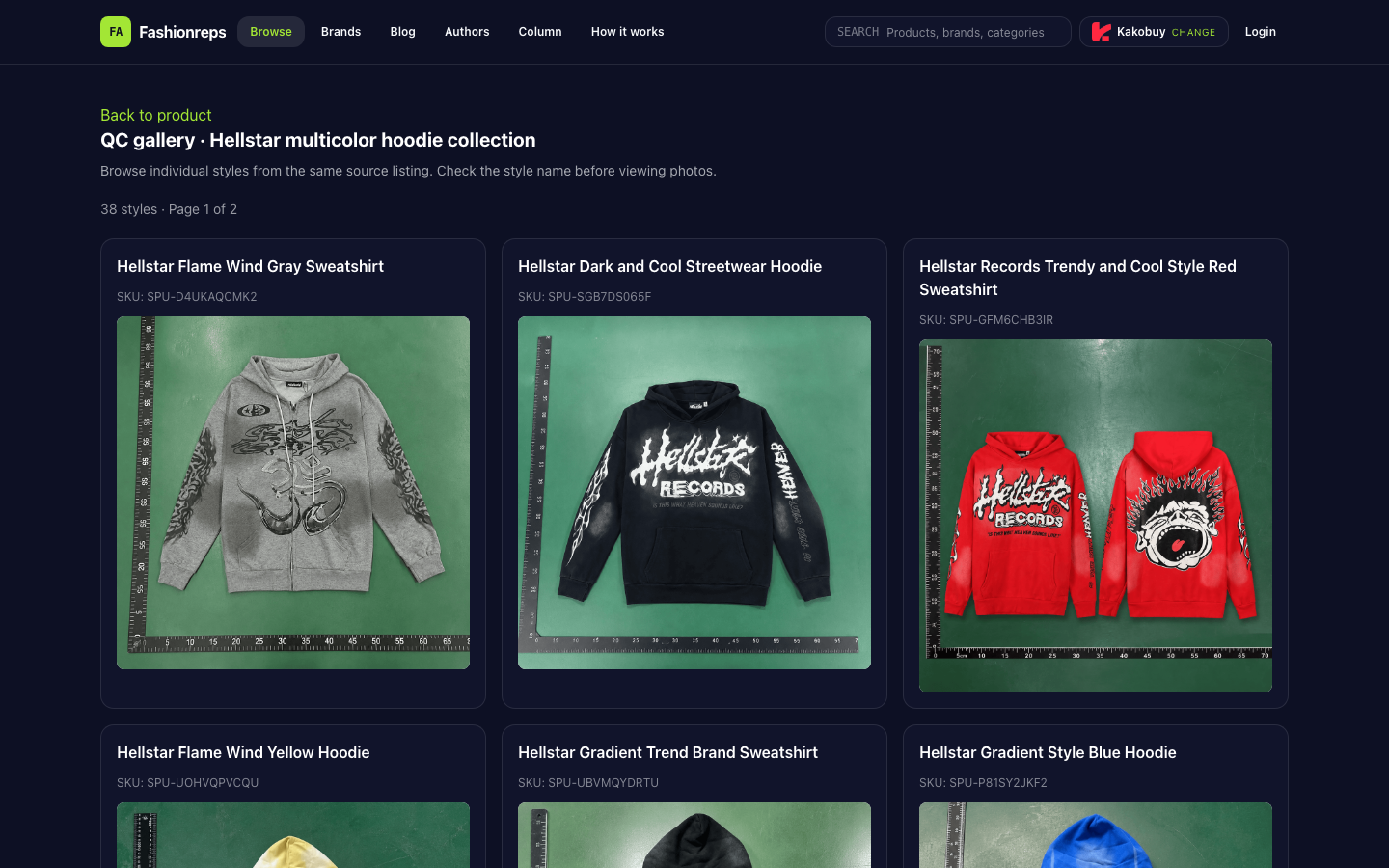
Currently verifiable product information comes from the Fashionreps Hellstar multicolor hoodie collection QC page. The page lists multiple independent styles, including different colors, prints, and product codes, but does not provide any currently valid coupon codes, discount amounts, usage thresholds, or checkout results. Therefore, it cannot be asserted that a particular Hellstar hoodie is definitely eligible for a discount, nor can it promise how much will be saved.
Lock in the Specific Product Variant First
Don't treat a collection page as a single product. The information page shows that the collection contains multiple independent styles, such as:
- Hellstar Dark and Cool Streetwear Hoodie, SKU SPU-SGB7DS065F
- Hellstar Flame Wind Yellow Hoodie, SKU SPU-UOHVQPVCQU
- Hellstar Gradient Style Blue Hoodie, SKU SPU-P81SY2JKF2
- Hellstar Records Flame Wind Black Hoodie, SKU SPU-YZNNNCOBA5
- Hellstar Tie-Dye Style Orange Hoodie, SKU SPU-L9VJETP2TV
- Hellstar Trendy Brand Light Blue Hoodie, SKU SPU-LPWCFOZN0E
These names and SKUs can only help identify the styles on the page, not prove inventory, price, size, or discount eligibility. When preparing to order, record the following information first:
- Product name and SKU.
- Specific print, color, and size.
- Current status of the product page, such as available for purchase, out of stock, or only QC images.
- Product amount shown on the product page.
- The chosen shopping agent and corresponding checkout entry.
If the page only shows QC images and has no accessible product purchase page, price, or inventory, it should not be considered a currently purchasable recommendation. Product links and checkout page evidence should be supplemented first.
Coupon Verification Sequence
Whether the discount applies to a variant should be confirmed within the same target shopping agent's account and checkout environment. It is recommended to follow this sequence:
1. Check the Discount Entry
Go to the target shopping agent's coupon, promotion, or checkout discount page, and record the campaign name, applicable scope, and display time. The information page shows multiple optional shopping agents, but does not prove that these agents currently offer Hellstar-exclusive discounts, nor that the campaign conditions are the same across different agents.
2. Verify the Applicable Target
Focus on whether the discount is limited to:
- Specific brands, stores, or product links
- Designated product categories or specific styles
- New users, specific account levels, or specific payment methods
- A certain region, warehouse, or shipping route
- Only the product amount, or also covering service fees or shipping fees
If the rules only say "some products apply" without listing Hellstar, the corresponding store, or product link, it should not be directly assumed that the current variant meets the conditions.
3. Check Thresholds and Exclusions
Record the minimum purchase amount, maximum discount amount, usage count, per-account limit, and excluded items. Also note that some campaigns may exclude special-priced items, pre-sale items, specific stores, or items already participating in other campaigns.
Different prints or colors in the same collection may correspond to different product links. Even if the discount supports a certain Hellstar page, it cannot automatically prove that another SKU in the same collection is also applicable.
4. Check Stacking Rules and Validity Period
Confirm whether the discount can be stacked with store discounts, platform campaigns, points, or other coupons, and record the expiration time and time zone. If the page does not clearly state what can be stacked, the system's actual acceptance at checkout should be the final result.
When there is no verifiable coupon code or clear campaign rules, only the verification method can be explained; discount percentages cannot be filled in arbitrarily, nor can a universal coupon code be assumed to exist.
Break Down Final Fees Before Payment
The discounted amount is not equal to the final payable amount. Before payment, record the fields on the checkout page separately to avoid mistaking product discounts for a reduction in total fees:
- Original product amount
- Product discount or coupon reduction
- Shopping agent service fee
- Payment processing fee
- Packaging or storage fees
- International shipping fee
- Other taxes or surcharges, if clearly listed on the page
- Exchange rate, settlement currency, and actual deduction amount
It is recommended to add up the numbers shown on the checkout page item by item, then check whether the discount is actually deducted. If the system only shows a "total" without explaining which item the discount applies to, save the page information and confirm with the target shopping agent.
Stop Payment in These Situations
If any of the following occurs, do not continue payment based solely on product name or search results:
- The coupon shows unavailable, but the page does not explain why.
- The variant, size, or product link cannot be matched with the campaign's applicable target.
- The product page has no price, inventory, or valid purchase entry.
- The discount shows in the cart but disappears after entering checkout.
- The checkout page does not clearly distinguish product amount, fees, and discount amount.
- A threshold needs to be met, but the system does not show the calculation basis.
- The campaign validity period, region restrictions, or account restrictions are unclear.
- The checkout amount is inconsistent with the expected discounted amount.
At this point, you need to supplement the target shopping agent's campaign page, specific product page, and final checkout screenshots or text fields. Only when this information corresponds to the same product variant and the same account environment can it be determined whether the discount truly applies.
Conclusion
The currently verified information can confirm that the Hellstar multicolor hoodie collection page lists multiple print and color variants, and provides corresponding QC pages and some SKUs; however, the information does not provide current coupon codes, thresholds, exclusions, validity periods, or actual checkout amounts. Therefore, it cannot be confirmed that a particular Hellstar hoodie already meets the discount conditions, nor can a reliable final price be calculated.
Before actually ordering, lock in the specific SKU and variant first, then check item by item in the target shopping agent's promotion entry and checkout page. Only when the discount is accepted by the system, and the fields such as product amount, service fee, payment fee, packaging fee, international shipping fee, and exchange rate are all displayed, can the final payable amount be determined.
Community feedback
0 approved
- Readers
- No approved comments yet.
Keep reading on this site
Black Drawstring Athletic Shorts: Color & Styling Tips / Supreme, Polo, Carhartt Winter Flat-Lay: Color & Styling / Winter Streetwear Flat Lay: Jackets, Sweats & Details