Fear of God Essentials Hoodie: FashionReps & Google Sheets
-
Find your place
First, Define Recording Boundaries If the goal is to organize hoodie candidates, the safest approach is to treat FashionReps as the entry point for product and QC evidence, and Google Sheets as the candidate list and review status table. This prevents mistaking what you see while browsing pages as verified purchasing conditions. The currently verifiable page is the "[Fear of God Essentials](https://fashion-reps.net/brand/fear-of
Editor score 4.2 / 5
First, Define Recording Boundaries
If the goal is to organize hoodie candidates, the safest approach is to treat FashionReps as the entry point for product and QC evidence, and Google Sheets as the candidate list and review status table. This prevents mistaking what you see while browsing pages as verified purchasing conditions.
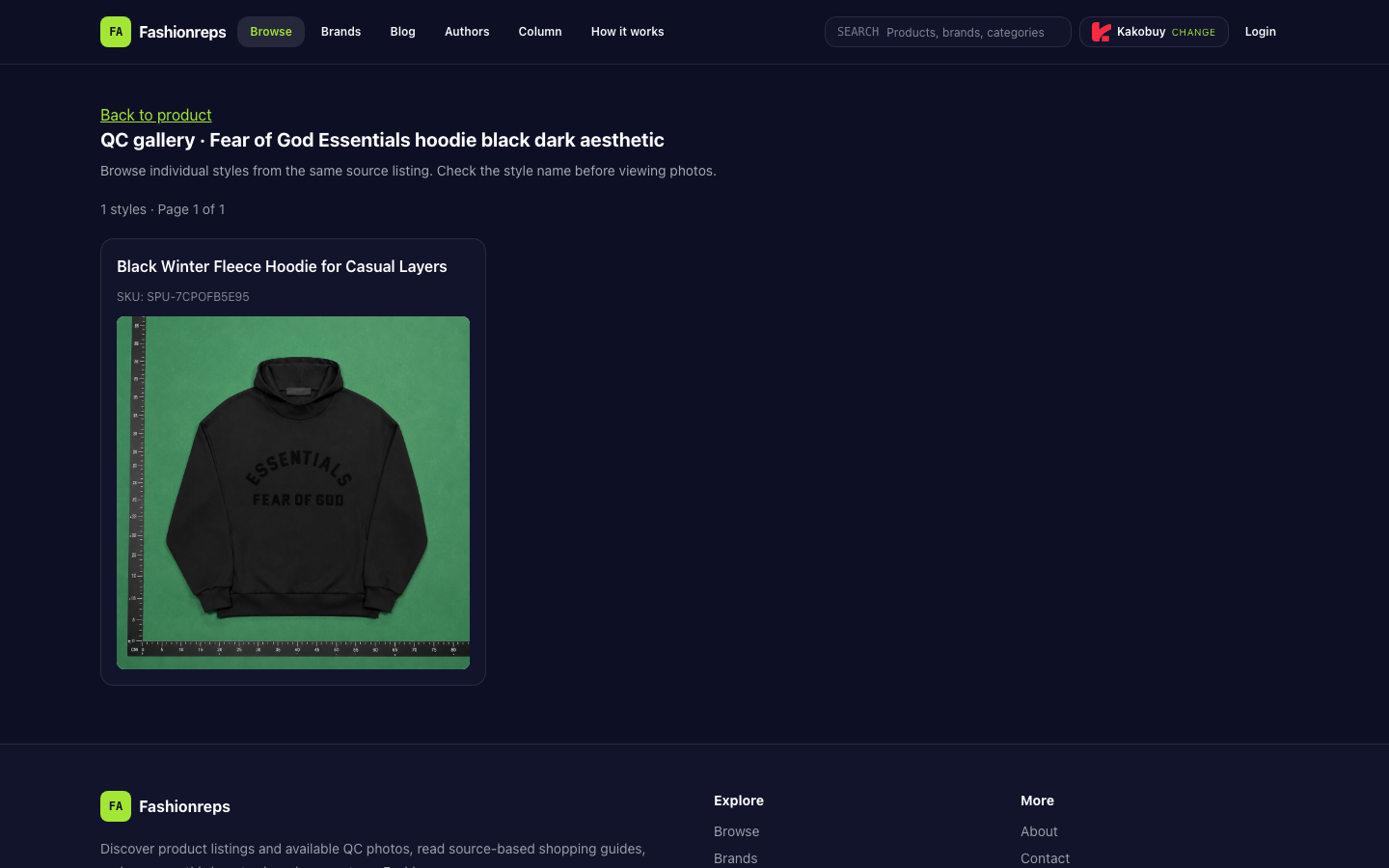
The currently verifiable page is the "Fear of God Essentials hoodie black dark aesthetic" QC page on FashionReps. The page shows that there is 1 style under this source, with the style name "Black Winter Fleece Hoodie for Casual Layers" and SKU
SPU-7CPOFB5E95. The available evidence does not provide price, inventory, shipping, or a complete size chart, so these fields cannot be directly filled in as confirmed conclusions.
What to Record First on the FashionReps Page
Complete a page verification before entering information into the sheet. It is recommended to record only content that is actually visible or explicitly provided on the page:
- Product theme or page title: Fear of God Essentials hoodie black dark aesthetic
- Style name: Black Winter Fleece Hoodie for Casual Layers
- SKU: SPU-7CPOFB5E95
- Number of currently visible styles: 1
- QC images: Record whether they exist and save the corresponding page location
- Product page or QC page: Keep as an entry point for subsequent review
- Color, size, fit, and dimension evidence: Record separately; do not fill in based on title or image impressions
The page also indicates that you can browse different styles under the same source and requires confirming the style name before viewing photos. Therefore, if multiple similar styles appear later, do not merge records based solely on thumbnails or similar titles.
Which Fields Are Suitable for Management in Google Sheets
The purpose of the sheet is not to replace the product page but to place scattered identity information, evidence status, and exclusion reasons in the same row. The following set of fields can be used:
Field Suggested Entry Product Name Use the name displayed on the page; do not change it to a marketing name SKU Record the SKU provided on the page, e.g., SPU-7CPOFB5E95 Color Only fill in the color explicitly shown on the page; mark as "to verify" if no evidence Size Record the sizes or size chart actually provided on the page; leave blank and mark as "to verify" if missing Fit Record the page's explicit description; do not infer loose, straight, etc. from photos QC Status e.g., Not viewed, Viewed, Insufficient evidence, Needs review Image Evidence Record whether QC images exist and which style they correspond to Page Status Valid, Needs review, Invalid, or Excluded Exclusion Reason e.g., Style mismatch, Missing size evidence, Link cannot be verified Keep one row per candidate. If different colors or styles exist under the same source, split into multiple rows only when the page clearly distinguishes them, and record SKU, images, and size evidence separately.
How to Divide Responsibilities Between the Two
FashionReps is better suited for tasks related to discovery and verification entry points:
- Browse candidates by brand or product theme
- Check whether QC images exist on product pages
- Confirm page title, style name, and SKU
- Return to the corresponding page to review images and links
- Ensure you are viewing the correct style before entering an external shopping agent process
Google Sheets is better suited for organization and filtering tasks:
- Combine identity fields from multiple candidates
- Filter items pending review by QC status
- Identify rows missing size or image evidence
- Record exclusion reasons to avoid duplicate checks
- Create a checklist for the next round of product page verification
This is not a comparison of speed, inventory, or quality between the two. The available information only supports their different roles in the process and cannot be used to assert which is faster or prove that a candidate is in stock or of reliable quality.
A Organized Workflow to Avoid Missing Items
Step 1: Create Candidate Row
Copy the name displayed on the page, SKU, and page entry point from the product or QC page. Do not fill in price, shipping, inventory, or size information that is not shown.
Step 2: Verify Image Attribution
Confirm that the QC images correspond to the same style name as the current candidate. The current page shows 1 style, so it can be treated as a single candidate; if other styles appear later, re-verify and do not directly reuse existing image evidence.
Step 3: Split Evidence Status
Record color, size, fit, and images separately. Fill in facts for confirmed fields and "to verify" for fields without evidence; do not replace source information with "looks like" judgments.
Step 4: Set Up Review Filters
In Google Sheets, prioritize filtering the following types of rows:
- SKU is empty
- Size evidence is missing
- QC status is still "Not viewed"
- Page status is "Needs review"
- The same product name appears multiple times
- Exclusion reason is not yet filled in
Step 5: Return to the Page for Final Verification
The sheet can only tell you which items need to be reviewed; it cannot replace the product page. The next step is to reopen the candidate page, confirm the link still works, the style name matches, and supplement size or image evidence actually provided by the page. If the page is invalid or cannot be verified, mark it as "Needs review" or "Excluded" rather than as a purchasable recommendation.
Final Judgment Criteria
A candidate that can proceed to the next step of verification should at least meet the following conditions:
- Page name matches the candidate record
- SKU is recorded or the reason for its absence can be explained
- QC images indeed correspond to the current style
- Color, size, and fit fields are separately marked as confirmed or to verify
- The page entry point is still verifiable
- Price, inventory, shipping, or quality conclusions are not written as unverified facts
Following this workflow, FashionReps is responsible for providing product catalog and QC page evidence, while Google Sheets maintains candidate identity, gaps, and review order. The current record can be kept as a candidate pending review, but the available evidence is insufficient to support specific judgments on price, inventory, shipping, complete sizing, or quality.
Community feedback
0 approved
- Readers
- No approved comments yet.
Keep reading on this site
Black Drawstring Athletic Shorts: Color & Styling Tips / Supreme, Polo, Carhartt Winter Flat-Lay: Color & Styling / Winter Streetwear Flat Lay: Jackets, Sweats & Details