Evisu Jeans: Catalog vs Google Sheets for Fit, Size, Pics
-
Find your place
Defining the Candidate Jeans Organization and Pre-Purchase Judgment When you see multiple evisu jeans candidates at once, the real problem isn't bookmarking pages—it's building a reviewable candidate list: which product corresponds to which page, what fit and color information is available, whether the size is confirmed, where the image evidence is, and whether the next step is further verification or holding off on ordering. This article is for buyers who need to organize multiple candidates
Editor score 4.2 / 5
Defining the Candidate Jeans Organization and Pre-Purchase Judgment
When you see multiple evisu jeans candidates at once, the real problem isn't bookmarking pages—it's building a reviewable candidate list: which product corresponds to which page, what fit and color information is available, whether the size is confirmed, where the image evidence is, and whether the next step is further verification or holding off on ordering.
This article is for buyers who need to organize multiple candidates, compare product cards and images, and keep a filtering record in Google Sheets. It is not for treating the spreadsheet as a substitute proof of inventory, price, size, or quality, nor for ordering directly from thumbnails without opening the product detail page. Page information may change; the fashion-reps page features described in this article were verified as of the page visible on October 19, 2026.
After the judgment, you should be able to do three things: locate the candidate category, record the evidence location for each candidate, and decide whether to proceed to an external shopping agent page based on a clear verification status. 🧭

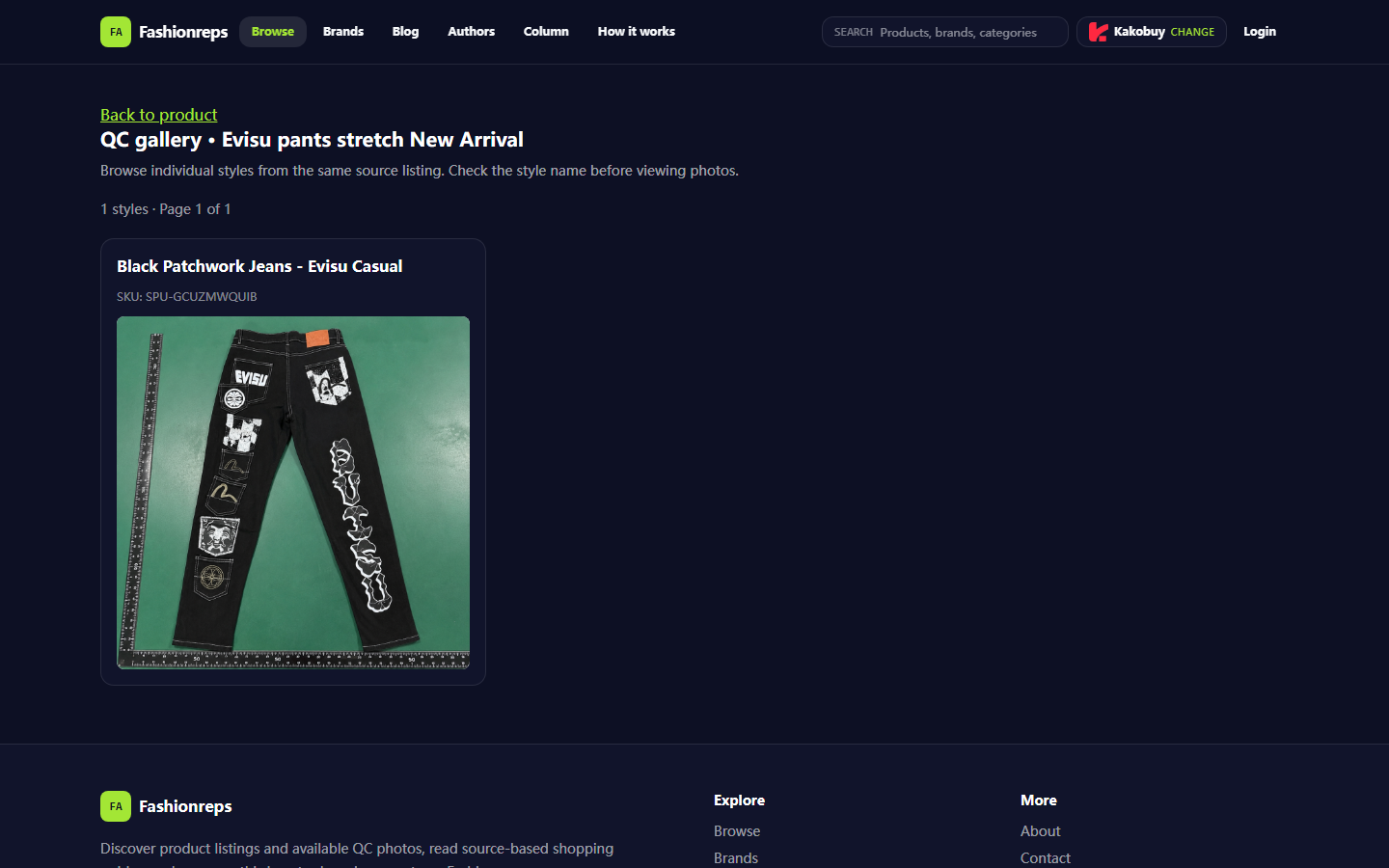
Figure: Example of Fashionreps product and QC image browsing page. The image illustrates how page information is organized and does not imply that any product has been tried on, purchased, or received.
Locating the evisu Jeans Category from the fashionreps Website-Style Spreadsheet
The fashion-reps.net page layout is closer to a browsable product catalog and information hub. The site provides navigation such as Browse, Brands, Blog, and How it works, and on product pages it displays the source product, product name, SKU, and available QC image entry points. The page also indicates that the Buy button leads to a shopping agent chosen by the user, and that orders, payment, and logistics are handled by the agent's website.
Therefore, the first step should be to enter from the brand or product catalog, not to fill a set of assumed fields in Google Sheets first. The catalog is for discovering candidates, and the spreadsheet is for saving judgment results; they serve different tasks.
After opening the category or brand page, record the following:
- The product name or source title displayed on the page
- The brand or category the product belongs to
- The product page URL
- Whether the page loads properly
- Whether there is a clear product card
- Whether QC images or other viewable evidence is provided
- The SKU, number of styles, or variant hints displayed on the page
If the page is just a collection of tags, an empty result, a broken redirect, or lacks clear product information, it should not be counted as a valid candidate. 🔎
Checking Fit, Color, Size, and Images in the Product Cards
Product cards are good for quickly building a candidate list, but they cannot automatically prove that every field is complete. When organizing, you should separate what the page explicitly displays from what is not yet confirmed.
For example, one verified Evisu QC page shows the source name as "Evisu pants stretch New Arrival," lists 1 style, and displays the style name "Black Patchwork Jeans - Evisu Casual" and SKU "SPU-GCUZMWQUIB." These are visible page information that can be recorded in the spreadsheet; but the page summary alone cannot prove the complete size chart, stock status, fabric composition, actual price, or fit.
Recommended order of checking:
- First confirm that the product name corresponds to jeans, not just the brand name.
- Then confirm that the style name, color description, and SKU appear on the same product card or detail page.
- Open the image or QC page and check whether the images belong to that style, not to other styles from the same source.
- Divide size information into three statuses: "displayed on page," "pending detail page confirmation," and "not provided."
- For price, stock, shipping, taxes, and return/exchange conditions, mark the verification date separately; do not infer from images or titles.
Images mainly help you confirm style correspondence, color representation, and whether the page provides viewable QC material. They are not a substitute for physical measurements and cannot prove fabric feel, durability, or brand authenticity. 📷
Designing Candidate, Link, Evidence, and Notes Columns in Google Sheets
The advantage of Google Sheets is not providing product facts, but allowing you to put multiple candidates into one view and filter by status, fit, or evidence completeness. It is recommended to put only one independent candidate per row, not multiple styles crammed into one cell.
Field How to record Purpose Candidate ID e.g., EVI-001 Avoid using the product title as the only identifier Product Name Record the page-visible name as is For returning to the original page to verify Fit or Style Description explicitly written on the page Distinguish straight, loose, or other unconfirmed categories Color Record page text and images separately Prevent treating image appearance as official color name Size Status Displayed, pending confirmation, not provided Directly determines next verification action SKU Fill when explicitly displayed on the page For distinguishing different styles from the same source Product Page Save the original URL For tracing back to the source Image Evidence QC, detail images, or none Record evidence type without exaggerating its meaning Verification Date Use the actual check date Identify potentially outdated information Status Pending verification, comparable, put on hold Manage subsequent work Notes Only write specific gaps Avoid writing unverifiable opinions Do not write "good quality," "authentic," or "standard sizing" as conclusions without evidence. Safer phrasing is "Page has QC images, still need to confirm measurement data" or "Product name recorded, color and size information insufficient."
Comparing Category Browsing, Keyword Search, and Spreadsheet Filtering Workflows
Three methods suit different stages.
Category browsing suits discovering candidates. It helps you see multiple product cards under the same brand or category, reducing omissions caused by relying only on a single keyword, but requires opening each page to confirm specific information.
On-site keyword search suits quickly locating words already in existing titles, such as the brand name, pants, or jeans. Search results still need to be checked to see if they are valid product pages, because a keyword hit does not mean the page has complete product information.
Google Sheets filtering suits organizing confirmed candidates. For example, you can filter rows where "size status is pending confirmation" to focus on detail page verification, or filter rows with "QC images but no SKU" to avoid mistaking image evidence for complete product identity.
Recommended workflow order:
- First use catalog or search to discover candidates
- Then confirm product pages and image evidence one by one
- Then write confirmed fields into the spreadsheet
- Finally use filters to schedule the next batch of verification tasks
This avoids a spreadsheet that looks complete but actually contains content bulk-copied from titles. ✅
Checking Product Detail Pages, Variant Correspondence, and Page Update Time
The same source page may contain multiple styles, and the QC page may organize images in a "styles under the same source" manner. When viewing images, you must first confirm the currently selected style name, then determine whether the images belong to that style.
If a page shows multiple styles, it is recommended to create a separate row for each style and save separately:
- Style name
- Color or pattern description
- SKU or other page identifier
- Corresponding image entry
- Whether the size information belongs to that style
- Page update time or the verification date of this check
Do not copy images of other styles from the same page into the current candidate row. If the page does not clearly indicate the correspondence between images and variants, set the status to "pending confirmation" rather than categorizing on your own.
Page update time does not necessarily equal inventory update time, nor does it mean prices or agent shipping costs are still valid. For price, stock, shipping, taxes, and after-sales policies, you should re-verify the applicable country, currency, and date before preparing for the next purchase step.
Distinguishing Between Centralized Image Viewing and Spreadsheet Batch Recording
Centralized image viewing suits answering questions like "Do these images belong to the current style?" and "Does the page provide enough QC material?" It helps you spot possible differences between color descriptions and image appearance, and reminds you not to mix images from different styles.
Spreadsheet batch recording suits answering management questions like "Which candidates are still missing sizes?", "Which page links are broken?", and "Which styles already have SKU and image evidence?" It cannot judge fabric feel, fit on body, or physical quality from images.
If images cannot clearly support a judgment, recording "insufficient images" is more useful than writing a guess. For jeans that require precise fit, the next step should be to find actual measurement data on the product detail page, and record waist, length, hip, or leg opening fields as written on the page, noting the measurement method and possible errors.
Handling Broken Links, Missing Fields, and Duplicate Candidates
When a link is broken, do not immediately delete the original record. First keep the original URL, the last verification date, and the broken status, then search again from the brand or catalog page to see if a new product page exists. This helps distinguish between delisting, link changes, and temporary access issues.
When fields are missing, use explicit empty statuses:
- Not provided: the page does not have that information
- Pending confirmation: need to open detail page or external agent page
- Not applicable: the field truly does not apply to the current candidate
- Cannot access: current check could not be completed, does not mean the product lacks that information
When dealing with duplicate candidates, compare SKU, product page, style name, and image evidence first. Similar titles do not necessarily mean duplicate products; different variants under the same SKU should not be merged without variant evidence. You can keep duplicate records and mark them as "suspected duplicate," and merge them only after sufficient evidence, to avoid mistakenly deleting candidates.
Using a Final List to Decide Whether to Continue Verification or Hold Off on Ordering
The purpose of the final list is to transform "looks like I like it" into actionable judgment. Each candidate should have at least the product name, original page, style or color information, size status, image evidence status, verification date, and next-step notes.
You can group by the following criteria:
- Continue verification: product page accessible, style identity clear, still need to confirm size or purchase conditions
- Comparable: candidate information relatively complete, can be compared with other styles by fit, size data, and evidence completeness
- Hold off on ordering: page broken, variant relationship unclear, size data missing, or key price and stock information not re-verified
- Remove duplicates: confirmed to use the same product identity and evidence as another row
Before ordering, still confirm on the actual shopping agent page whether the product is purchasable, whether price and stock apply, how shipping and taxes are calculated, and whether return/exchange conditions suit the destination country. fashion-reps' catalog and QC pages can help you discover and organize candidates, but cannot replace the agent website's order, payment, warehousing, consolidation, shipping, and after-sales processes.
Finally, merging candidate lists usually saves time from repeated searching and repeated recording, especially when comparing multiple jeans styles; the trade-off is that maintaining the spreadsheet takes extra time and may cause wrong judgments due to old links or outdated fields. It suits people who need multi-style comparison, value evidence retention, and are willing to re-check pages before ordering. It is not recommended to mechanically create a complex spreadsheet when product information is extremely scarce, the page is inaccessible, or you only plan to purchase a single, fully verified candidate.
Community feedback
5 approved
Reader score 4 / 5 (5 ratings)
- AishaR 4 / 5
- The 'is the next step verification or hold off' framing is what I needed. I tend to rush into ordering when a pair looks close enough. Keeping a short list with confirmed sizes first makes way more sense than juggling bookmarks.
- tom_b 3 / 5
- Decent overview. I'd add that jotting down painted vs plain seagull details matters too, since they show up differently in photos. Not a huge deal but it helps separate two similar candidates when you review the list later.
- vintagehunter88 4 / 5
- Good reminder that fit info varies a lot between listings, even for the same model. I always check the size chart twice now, and if the waist measurement is missing I just wait. Better than gambling on a return.
- Lina K. 5 / 5
- Honestly the tab chaos is real. I had like nine Evisu listings open and no idea which one had the good back-pocket photos. Writing down the page link next to each candidate is such a simple fix, wish I'd done it sooner.
- denim_marco 4 / 5
- I keep a spreadsheet with columns for fit, color, size chart source and saved pics. Sounds boring but it saved me from ordering two nearly identical Evisu pairs. The article's point about tracking where the image evidence comes from is what I always forget.
Keep reading on this site
Black Drawstring Athletic Shorts: Color & Styling Tips / Supreme, Polo, Carhartt Winter Flat-Lay: Color & Styling / Winter Streetwear Flat Lay: Jackets, Sweats & Details