brazil Black Jersey Mismatch? Verify Style, Size & Link
-
Find your place
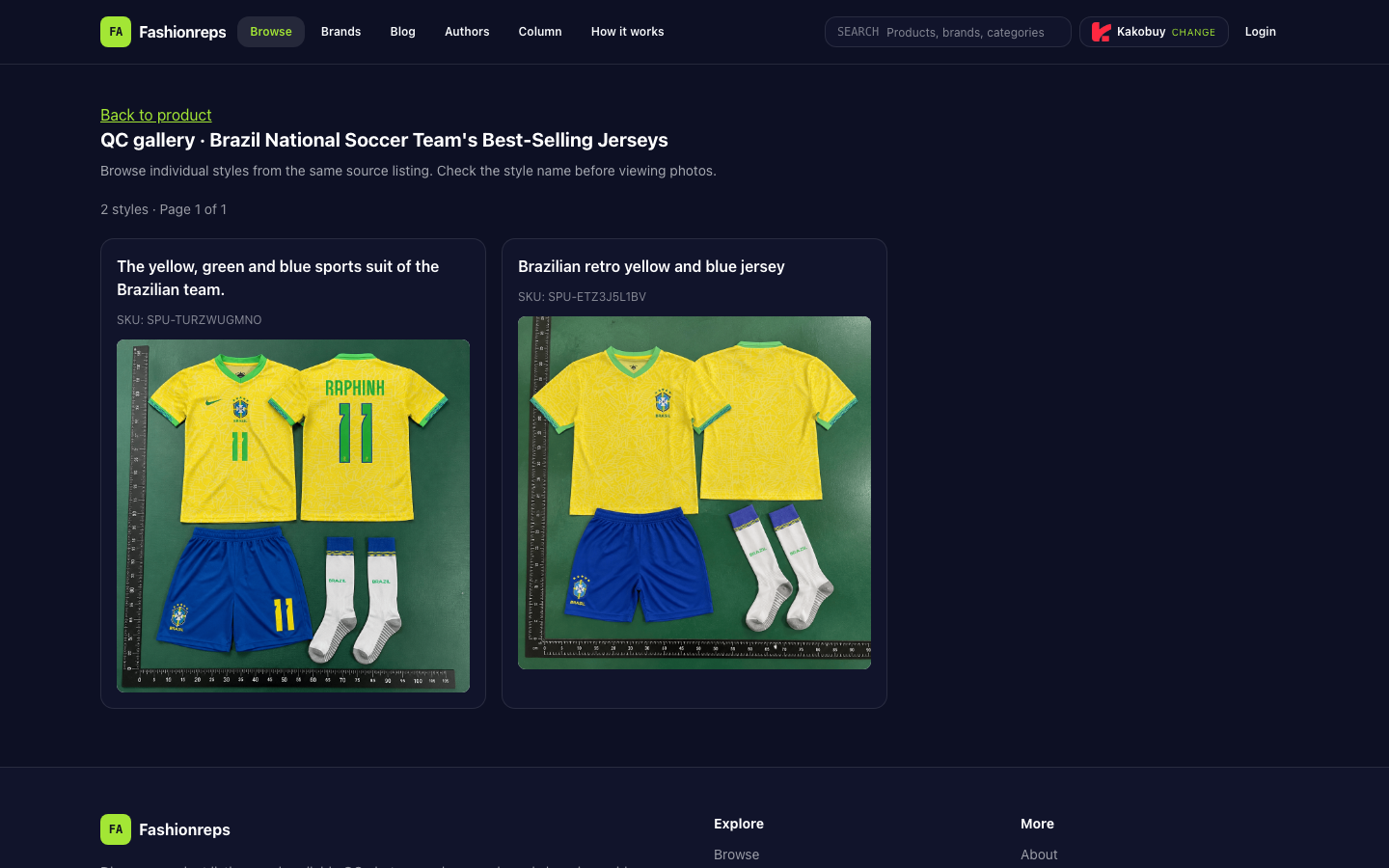
First, Determine: Is It Really the Same Product? If the page title says brazil black jersey, but the images, color options, sizes, or links point to a different style, do not pay immediately. The currently verifiable Fashionreps product page evidence only shows that this source has 2 styles: one is a Brazil team yellow, green, and blue sports set with SKU SPU-TURZWUGMNO; the other is a Bra
Editor score 4.2 / 5
First, Determine: Is It Really the Same Product?
If the page title says brazil black jersey, but the images, color options, sizes, or links point to a different style, do not pay immediately. The currently verifiable Fashionreps product page evidence only shows that this source has 2 styles: one is a Brazil team yellow, green, and blue sports set with SKU SPU-TURZWUGMNO; the other is a Brazil retro yellow-blue jersey with SKU SPU-ETZ3J5L1BV. Existing evidence does not prove that a black jersey is included.
Therefore, you cannot treat these two styles as a black jersey just based on the title, nor can you infer the color you want from the images or SKU on the page.

Record Five Fields First
Open the product catalog card, detail page, variant selection page, and checkout page, and record the following items one by one:
- Product title: Does it clearly state brazil, jersey, and black or other key information?
- Image color: Do the main image and variant images actually show a black jersey, rather than yellow, green, and blue colors?
- SKU: Is it consistent across different pages? The two known SKUs correspond to different styles and cannot be mixed.
- Size: Are the available sizes, size chart, and size shown on the checkout page consistent?
- Current link: Is the page still on the same product, or does it redirect to another style, another source, or a dead page?
When saving page screenshots, try to include the title, color options, SKU, size, and address bar in the same frame. This helps distinguish between a page display conflict and a link change after selecting a variant.
Check in Page Order
1. First, look at the catalog card
The catalog card can only be used as a preliminary identification. Confirm that the product name, thumbnail, and the target after entering the detail page are consistent. If the catalog card says black jersey, but after entering the detail page you only see yellow, green, or blue styles, stop selecting and do not treat the card title as the final product information.
2. Then look at the detail page and style selection
Check whether the page puts multiple styles under the same product. The current source clearly shows 2 styles and lists their SKUs separately. After selecting a style, re-check whether the image, name, and SKU change synchronously.
If after selecting "black" the image is still yellow-blue, or the SKU does not change but the size chart changes, it means the page fields do not form a reliable correspondence. At this point, you cannot confirm the product identity by guessing.
3. Finally, check the checkout page
Before entering payment, re-check the product name, color, size, and quantity on the checkout page. Focus on whether the checkout page retains the specific variant you selected on the detail page.
If any of the following occurs, pause payment:
- The checkout page does not show color or style.
- The product image on the checkout page is different from the selection on the detail page.
- The SKU is inconsistent between the detail page and checkout page.
- The size option is replaced, reduced, or cannot be confirmed on the checkout page.
- After the original link redirects, the page is no longer the original product.
Divide the Problem into Three Categories
Confirmed facts Fields to confirm with customer service Action when not yet unified Page shows 2 styles; two different SKUs are listed; existing evidence shows yellow, green, and blue colors Whether a black jersey exists; SKU for the black version; actual available sizes; whether checkout page binds the same variant Do not pay, do not buy yellow or yellow-blue as black Names or images on catalog, detail, variant, and checkout pages are inconsistent Which page field is the current valid product information; whether the redirected link still points to the same source Save screenshots and link, wait for platform's clear reply What to Provide When Asking the Platform for Help
When submitting a question through the official customer service, product feedback, or help entry available on the Fashionreps page, attach the following information:
- Current product link and page screenshots.
- Titles, colors, SKUs, and sizes shown on catalog card, detail page, variant page, and checkout page respectively.
- Your clear purchase conditions, such as black jersey and target size.
- Where the page conflict occurs, and whether there is a redirect before and after the conflict.
The question should directly require the platform to confirm three things: whether the black version actually exists, what the corresponding SKU is, and whether the checkout page still binds the same style after selecting that SKU. Do not just ask "Is there a black one?" because that does not solve the problem of whether the title, images, and links correspond.
It should be noted that the Fashionreps page is used to discover product information and QC images, while orders, payments, and logistics are handled by external shopping agent websites. If the problem occurs on the agent's checkout page, inventory, or payment process, you need to check with the agent actually handling the order; do not treat the product display on the Fashionreps page as proof of inventory or successful payment.
When to Stop Ordering
Before the following information is simultaneously consistent, it is recommended to stop operating:
- Title clearly points to the target style.
- Images indeed show the target color.
- Variant selection corresponds to the corresponding SKU.
- Target size can be confirmed on both detail page and checkout page.
- Current link does not redirect to another product.
- Platform or actual order processor can confirm that the checkout page binds that style.
Currently verifiable data can only prove that the page shows two yellow, green, and blue related styles, and cannot prove that a purchasable brazil black jersey exists, nor confirm its size, inventory, price, or checkout link. Therefore, before the platform provides clear additional evidence, this page should not be used as a reliable basis for purchasing a black jersey.
Community feedback
0 approved
- Readers
- No approved comments yet.
Keep reading on this site
Black Drawstring Athletic Shorts: Color & Styling Tips / Supreme, Polo, Carhartt Winter Flat-Lay: Color & Styling / Winter Streetwear Flat Lay: Jackets, Sweats & Details